React - Redux
The official binding library for integrating Redux with React.
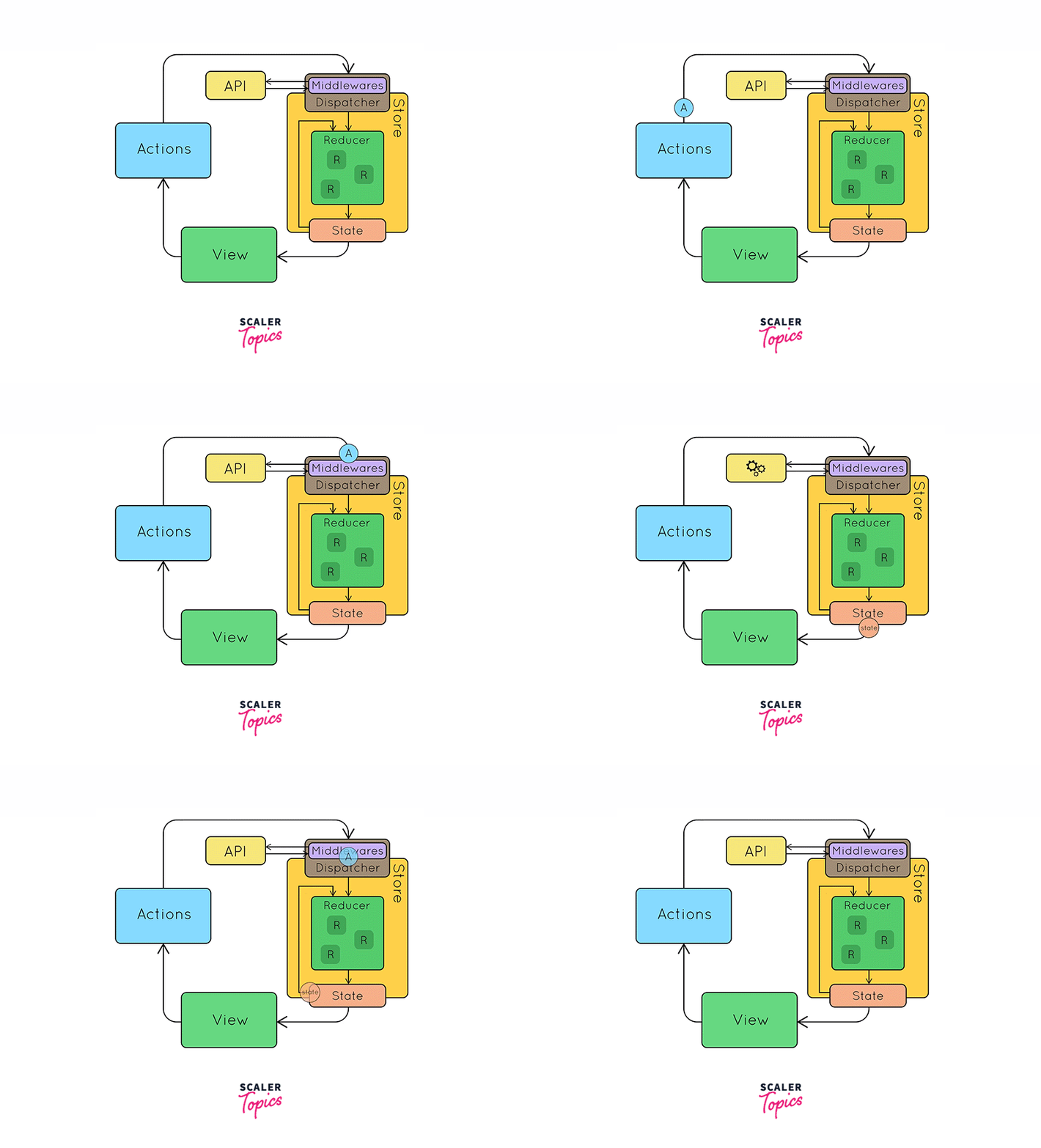
Project Structure
This structure is for reference purposes only
my-app/
├── public/
│   ├── index.html
│   └── ...
├── src/
│   ├── components/
│   │   ├── Counter.tsx
│   │   └── ...
│   ├── store/
│   │   ├── actions.ts
│   │   ├── reducers.ts
│   │   ├── store.ts
│   │   └── types.ts
│   ├── App.tsx
│   ├── index.tsx
│   └── ...
├── tsconfig.json
├── package.json
└── ...
Steps-by-steps
- Setup Redux Store: Configure a Redux store using
@reduxjs/toolkit. - Provide Store: Wrap your app with the
Providercomponent fromreact-redux. - Connect Components: Use
useSelectorto access state anduseDispatchto dispatch actions within your components.
Setting Up Redux
-
Install necessary packages:
npm install redux react-redux @reduxjs/toolkit -
Create Redux store and reducers:
src/store/store.tsimport { configureStore } from '@reduxjs/toolkit';import counterReducer from './reducers';const store = configureStore({reducer: {counter: counterReducer,},});export default store;src/store/reducers.tsimport { createSlice } from '@reduxjs/toolkit';export interface CounterState {value: number;}const initialState: CounterState = {value: 0,};const counterSlice = createSlice({name: 'counter',initialState,reducers: {increment: (state) => {state.value += 1;},decrement: (state) => {state.value -= 1;},incrementByAmount: (state, action) => {state.value += action.payload;},},});export const { increment, decrement, incrementByAmount } = counterSlice.actions;export default counterSlice.reducer; -
Provide the store to your React app:
src/index.tsximport React from 'react';import ReactDOM from 'react-dom';import { Provider } from 'react-redux';import store from './store/store';import App from './App';ReactDOM.render(<Provider store={store}><App /></Provider>,document.getElementById('root')); -
Create a component that interacts with the store:
src/components/Counter.tsximport React from 'react';import { useSelector, useDispatch } from 'react-redux';import { RootState } from '../store/store';import { increment, decrement, incrementByAmount } from '../store/reducers';const Counter: React.FC = () => {const count = useSelector((state: RootState) => state.counter.value);const dispatch = useDispatch();return (<div><div><button onClick={() => dispatch(decrement())}>-</button><span>{count}</span><button onClick={() => dispatch(increment())}>+</button></div><div><button onClick={() => dispatch(incrementByAmount(5))}>Increment by 5</button></div></div>);};export default Counter; -
Use the connected component in your app:
src/App.tsximport React from 'react';import Counter from './components/Counter';const App: React.FC = () => {return (<div><h1>Redux Counter</h1><Counter /></div>);};export default App;
TypeScript Types
For better TypeScript support, you should define types for your store and dispatch.
src/store/store.ts
import { configureStore } from '@reduxjs/toolkit';
import counterReducer from './reducers';

const store = configureStore({
  reducer: {
    counter: counterReducer,
  },
});

export type RootState = ReturnType<typeof store.getState>;
export type AppDispatch = typeof store.dispatch;

export default store;